트레이딩뷰에서 웹훅 알람 설정하기
트레이딩뷰의 웹훅 알람 기능은 자동화된 트레이딩 전략에 있어 중요한 역할을 합니다. 본 포스팅에서는 트레이딩뷰의 파인스크립트를 사용하여 웹훅 관련 변수를 작성하고, 이를 이용해 JSON 형태의 웹훅 메시지를 생성하는 방법, 그리고 매매 관련 함수에 alert_message를 추가하여 실제 알람을 설정하는 방법에 대해 상세히 설명하겠습니다.
파인스크립트 웹훅 관련 변수 작성하기
트레이딩 전략을 구성할 때, 사용자 정의 변수를 통해 전략의 유연성을 높일 수 있습니다. 다음은 웹훅 메시지에 포함될 여러 핵심 정보를 입력받는 파인스크립트 코드 예시입니다:
group_name = input.string("", title="Group Name")
key_name = input.string("", title="Key Name")
platform = input.string("binance", title="Platform", options=["binance", "bybit", "okx", "upbit", "bithumb"])
market = input.string("future", title="Market", options=["spot","future"])
currency = input.string("USDT", title="Currency", options=["USDT", "KRW", "BTC"])
symbol = input.string("USDT", title="Symbol")
orderType = input.string("MARKET", title="Order Type", options=["MARKET", "LIMIT"])
웹훅 메시지를 JSON 형태로 작성하기
매매 신호를 전송할 때, 웹훅 메시지를 JSON 형태로 구성하여 전략의 핵심 정보를 명시적으로 전달할 수 있습니다. 예를 들어, 진입 및 청산 신호에 대한 메시지를 다음과 같이 정의할 수 있습니다:
longMessage = '{"group_name": "' + group_name + '", "key_name": "' + key_name + '", "platform": "' + platform + '", "market": "' + market + '", "currency": "' + currency + '", "symbol": "' + symbol + '", "orderType": "' + orderType + '", "side": "buy", "price" : "[PRICE]", "qty_per": "[QTY]"}'
longCloseMessage = '{"group_name": "' + group_name + '", "key_name": "' + key_name + '", "platform": "' + platform + '", "market": "' + market + '", "currency": "' + currency + '", "symbol": "' + symbol + '", "orderType": "' + orderType + '", "side": "sell", "price" : "[PRICE]", "qty_per": "[QTY]"}'
매매 관련 함수에 alert_message 추가하기
{
    "group_name": "ExampleGroup",
    "key_name": "ExampleKey",
    "platform": "binance",
    "market": "future",
    "currency": "USDT",
    "symbol": "BTCUSDT",
    "orderType": "MARKET",
    "side": "buy",
    "price" : "[PRICE]",
    "qty_per": "[QTY]"
}
앞에서 작성한 설정 값을 통해서 json 문자열을 생성하고, 이를 사용하여, price, qty_per의 값을 replace함수를 통해서 원하는 값으로 수정하여 alert_message를 생성할 수 있습니다.
매매 전략의 핵심 부분인 진입 및 청산 로직에 웹훅 메시지를 포함시키는 방법입니다. 진입 및 청산 가격과 수량을 메시지에 동적으로 반영하여 전략 실행 시 웹훅 알람으로 전송됩니다:
// 진입 신호에 대한 메시지 설정
entryLongMessage = str.replace(longMessage, "[PRICE]", str.tostring(entry_price))
entryLongMessage := str.replace(entryLongMessage, "[QTY]", str.tostring(qty_per))
strategy.order("Entry" + str.tostring(i), strategy.long, qty=qty, limit=entry_price, alert_message = entryLongMessage)

// 청산 신호에 대한 메시지 설정
exitLongMessage = str.replace(longCloseMessage, "[PRICE]", str.tostring(close))
exitLongMessage := str.replace(exitLongMessage, "[QTY]", str.tostring(-1))
strategy.order("Exit", strategy.short, qty=strategy.position_size, limit=close, alert_message = exitLongMessage)
알람 설정하는 방법
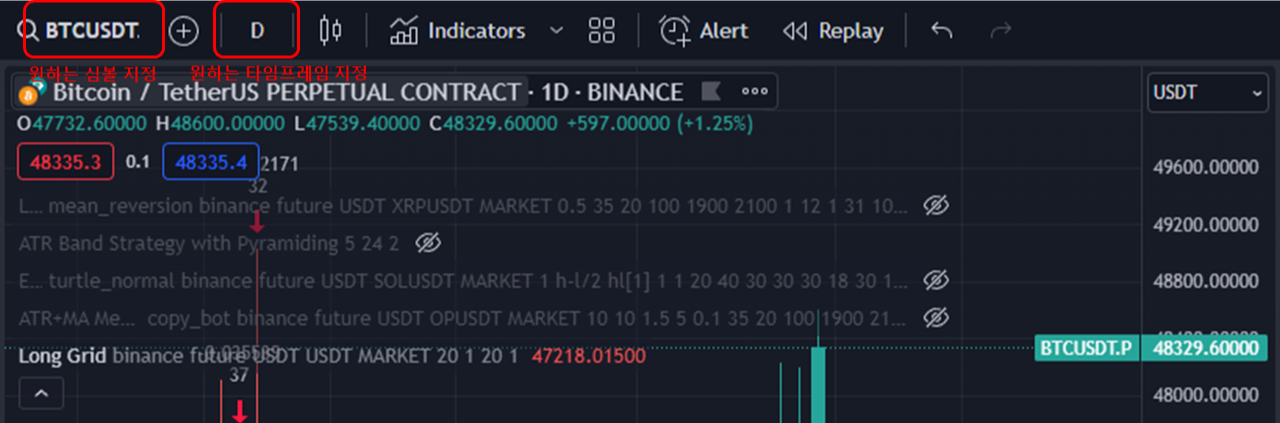
전략의 대상이되는 심볼을 지정합니다. 그리고 전략이 적용될 타임프레임을 지정합니다.
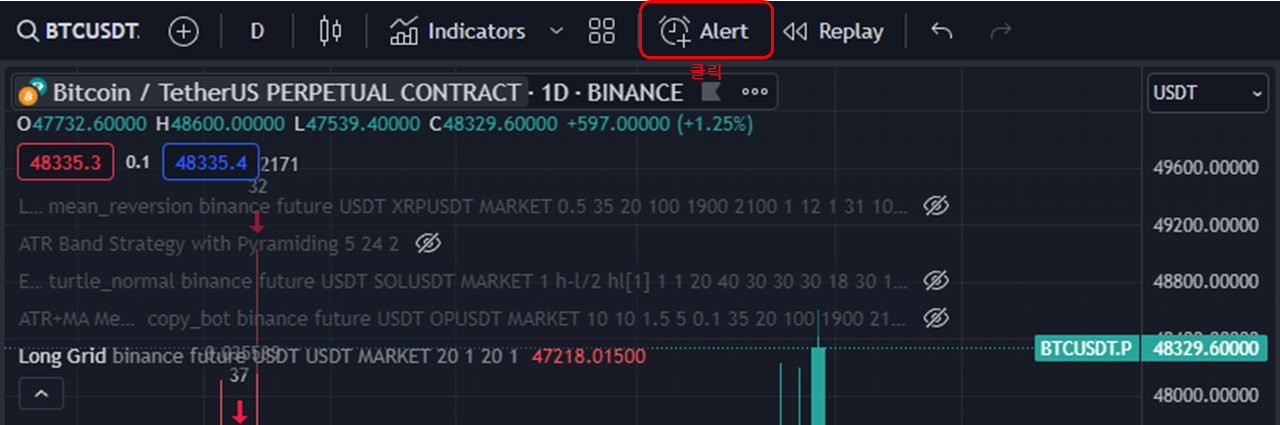
알람의 모양의 Alert를 클릭합니다.
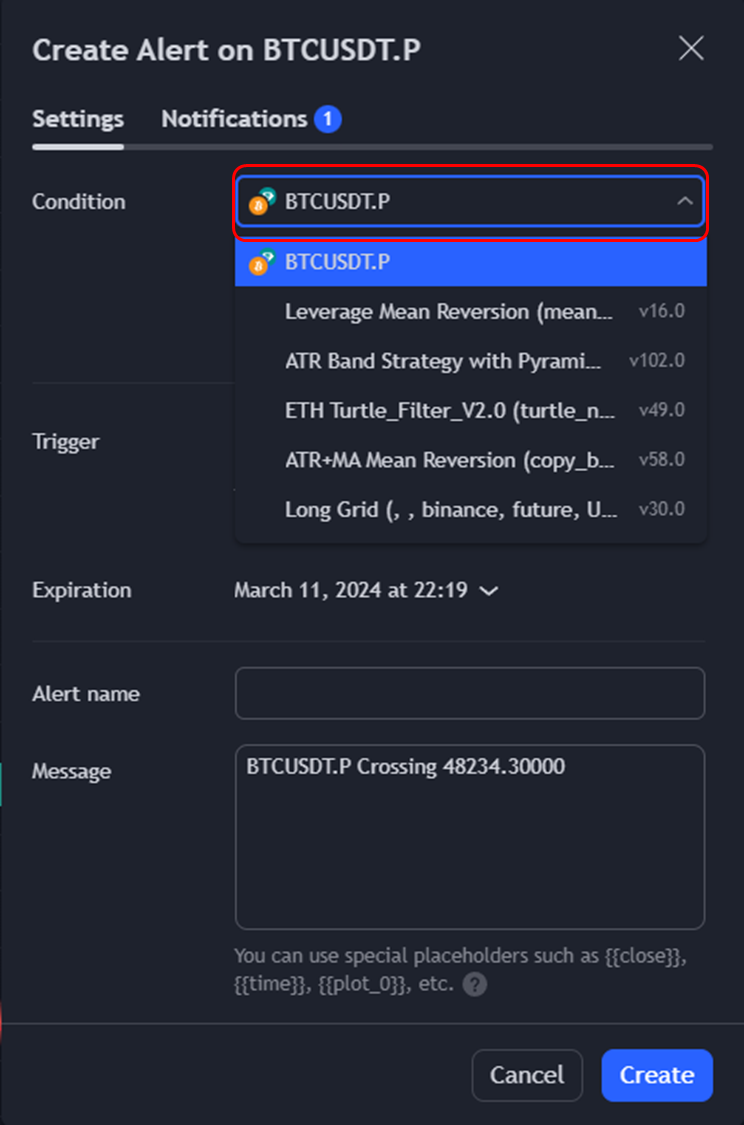
알람을 적용할 스크립트 이름을 선택합니다.
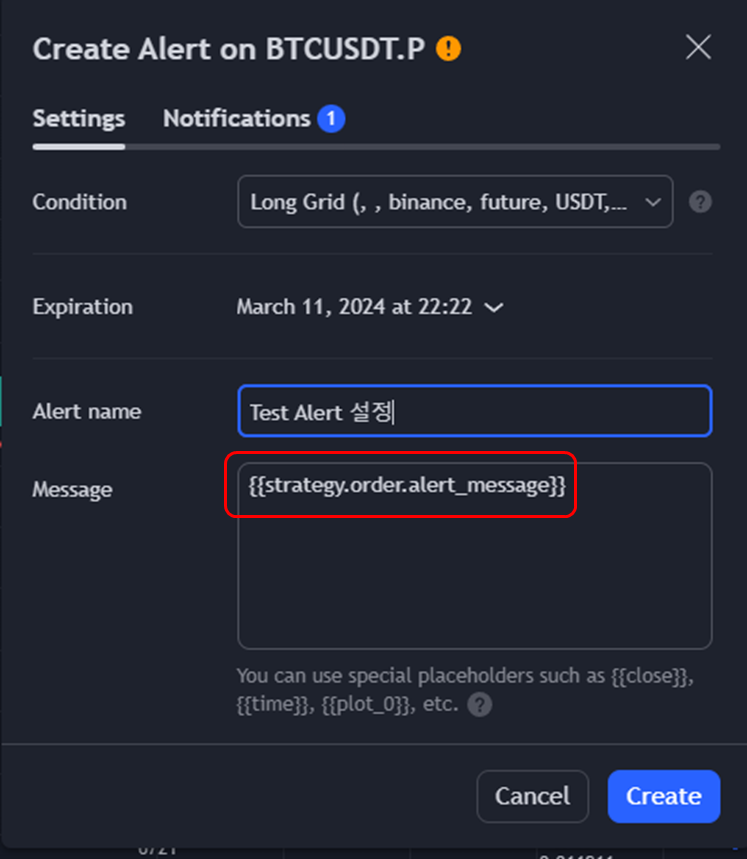
Alert name을 원하는 이름으로 설정하고, Message에 있던 내용을 제거하세요.
Message에 작성되는 내용은 매매 alert가 발생 시 webhook서버로 전송할 내용이 됩니다.
이전에 매매 alert_message에 작성한 내용이 전달되도록, 다음 내용을 채워넣어주세요.
{{strategy.order.alert_message}}
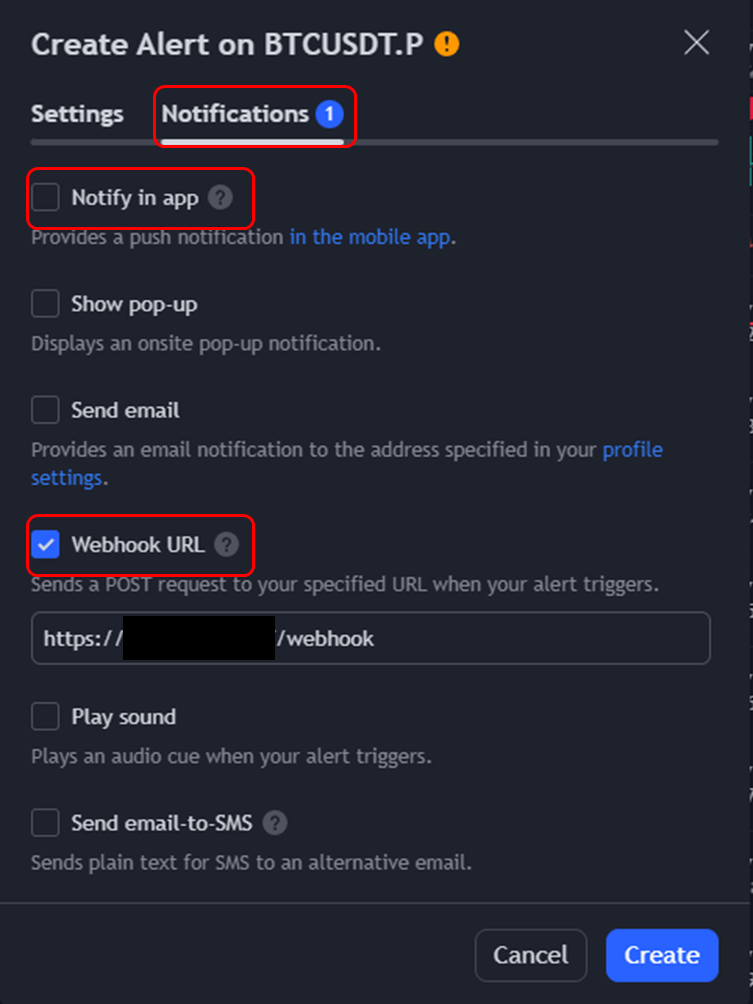
Notifications 탭을 클릭하여 탭을 이동하세요.
그리고 Webhook URL을 체크 후, Webhook server의 URL 정보를 입력하세요.
추가적으로 Notify in app 체크하면, 모바일 앱으로도 알람을 알림 받을 수 있습니다.
모든 설정이 끝났습니다. Create를 눌러서 알람을 생성하면, 이제부터 전략의 조건을 충족하여, 매매가 발생하는 경우 alert message를 발생시켜서 webhook url의 서버로 메시지를 전달하게 됩니다.
'Dev' 카테고리의 다른 글
| 트레이딩뷰 Webhook Server 만들기(FastAPI라이브러리) (0) | 2024.02.11 |
|---|---|
| 소프트웨어 기능 명세서 작성 방법 (0) | 2023.03.08 |
| 소프트웨어 개발 요구사항 명세서 작성 방법 (0) | 2023.03.08 |
| MacOS(Apple Silicon)에서 Docker Compose 최신버전으로 설치 및 사용 방법 (0) | 2023.03.01 |
| Docker 기본 명령어 튜토리얼 (0) | 2023.03.01 |

